Showing posts with label Facebook. Show all posts

Wednesday, 31 August 2011

Facebook Share button within Facebook


1.Create a javascript function:

 function sharePost() {
FB.ui(
  {
    method: 'stream.publish',
    attachment: {
      name: 'test',
 media:[{type:'image',src:'logo.jpg',href: 'www.facebook.com/test'}],
      description: ('Test.' ),
      href: 'http://www.facebook.com/pages/test/11111111?sk=app_111111111'
    }
  });
return false;
}

2. Add click event to the a tag.

<a href="#" onclick="sharePost(); return false;"  >button</a>


3. Add facebook init.


<div id="fb-root"></div>
<script>
window.fbAsyncInit = function() {
FB.init({appId: "11111111",
             status: true,
             cookie: true,
             xfbml: true});
FB.Canvas.setSize({width: 520, height: 1200});
};
(function() {
var e = document.createElement('script'); e.async = true;
e.src = document.location.protocol +
'//connect.facebook.net/en_US/all.js';
document.getElementById('fb-root').appendChild(e);
}());


</script>

Tuesday, 16 August 2011

Add Facebook share button (popup)


In order to make a shared button popup instead of it opening in a popup window you need to replace you 'a' tag with the follow:

<script>function fbs_click() {u=location.href;t=document.title;window.open('http://www.facebook.com/sharer.php?u=http:www.jiggyape.com','sharer','toolbar=0,status=0,width=626,height=436');return false;}</script><a rel="nofollow" href="http://www.facebook.com/share.php?u=<;url>" onclick="return fbs_click()" target="_blank">Share on Facebook</a>

replace the url after 'u=' with the url you want to share:

u=http:www.jiggyape.com'


Wednesday, 20 April 2011

Facebook Applications Details

Facebook loads your application through an Iframe so your web page will be hosted on your own server.


Dimensions 
The width provided for your application is 760px maximum, the height is not restricted so that is flexible. 


Friday, 15 April 2011

Facebook share link for Youtube Channels

You can create customised links for Facebook which show a description and an image when the link is generated. 
Facebook looks at the meta tags on the linked page and grabs data/content from the them. The description comes from the description tag which looks like the example below:
<meta name="description" content="Welcome to Fahim Chowdhury&#39;s Channel">
The image also has its own tag but there are two tags to insert to ensure it works, below is an example of those tags.

<link rel="image_src"href="http://i2.ytimg.com/i/AmJMOq-gvBcO8rYFsEmMBg/1.jpg?v=b7e829">

<meta property="og:image" content="http://i2.ytimg.com/i/AmJMOq-gvBcO8rYFsEmMBg/1.jpg?v=b7e829">

When building a Youtube channel you do not have access to the meta tags however Youtube have created a way for you to edit them.
Editing Youtube channel for Facebook share link
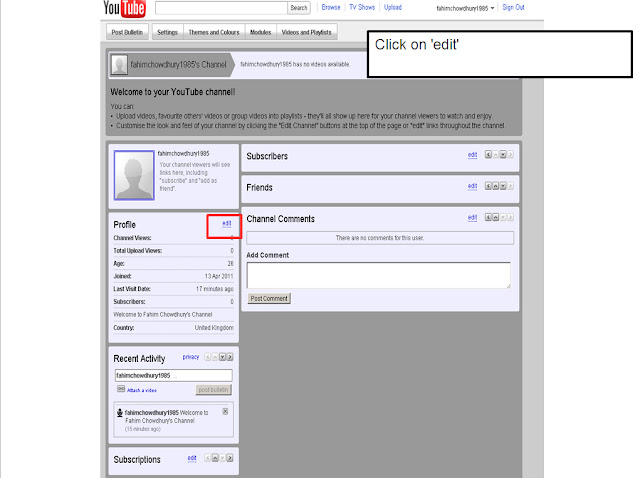
Open the channel page and click on the profile 'edit' button as show below.
Once the profile editing options opens locate the 'Channel Description' and enter your desired description for your Facebook share link description.
How to add an Icon Image for a Facebook share link
We need to edit the account image which will then be apart of the meta data.
First locate the 'Account' tab as shown below.
On the 'Account' page locate the 'profile setup' on the left hand side and click on it.
In the 'Profile setup' screen click on 'change picture and upload the image that is required for the Facebook share link.

That's it, now you can test the Facebook share link by pasting the Youtube channel link into your wall post. below is the outcome of this example.